- Guides, tutorials and docs
- Learning the Woovebox
- The very basics
- Quick start tutorial and video
- Tempo and BPM
- Tracks
- Patterns
- Live pattern recording
- Conditional triggering and modification
- Chords
- Arpeggios
- Scales and modes
- Genres
- Patches and Presets
- Sound design
- Paraphonic parts
- Multi-instrument mode
- Risers, fallers, sweeps & ear candy
- Live mode
- Song mode
- Full song writing
- Sampler & vocoder
- Sidechaining, gating, ducking and compression
- Mastering
- Lo-fi & vintage analog and digital emulation
- Randomization
- Hall effect sensor playing
- Advanced techniques
- Undo
- Boot modes
- MIDI, Sync and connecting other gear
- Remote control expander mode
- Wireless MIDI over Bluetooth
- Battery and charging
- Hardware quirks and limitations
- Understanding DSP load
- Looking after your Woovebox
- Firmware updates
Boot up
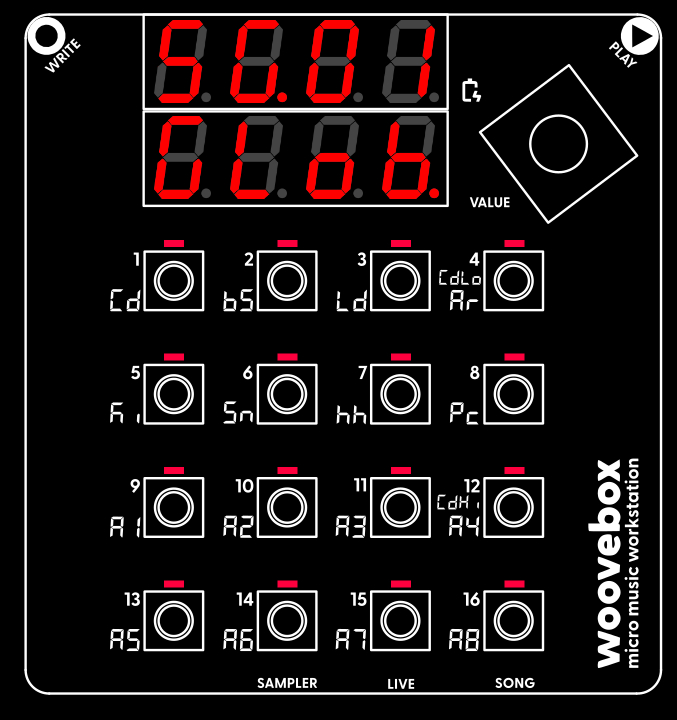
Turn on your Woovebox without touching the write or play touch buttons (as their sensitivity is calibrated during boot).
Once your Woovebox has booted up, you will be dropped into Song ("SG") mode.
The song number you last worked on, is automatically restored ("SG.01" through "SG.16"). The chord (Cd) track will play a chord/chime, to let you know boot up has completed. This chime also gives you an audible identifier of the song that is loaded (as you may recognize the timbre of the instrument).
Note that, when you switch away from Song mode, you can return to Song mode at any time, by holding the value button down and then short-pressing ("short-pressing" meaning, holding down for less than one second) 16/A8/SONG.
If you accidentally scrolled past the "GLob" or "EFct" pages and the display reads "Fr.xx" (fragment number xx) or "DJ.xx" (DJ FX for fragment xx), you can use the value knob (turn left) to scroll back to to the "SG.xx", "GLob" (or Efct) pages.
You may also be interested in...
- Model comparison
- Low Frequency Oscillators (LFOs) (under Sound design)
All LFO rates are related to song BPM and are expressed as fractions or multiples.
- 8. LG.Pi legacy pitch behavior (under Glob (song globals) page)
Adopt legacy behavior for up/dn note pitch conditional for use for songs made < FW 4223.
- 2. root song scale root note (under Glob (song globals) page)
- 16 x 16 x 16 x 16 (under The very basics)
Many other devices swap this, and often give you a number of tracks per pattern.
- Guides, tutorials and docs
- Learning the Woovebox
- The very basics
- Quick start tutorial and video
- Tempo and BPM
- Tracks
- Patterns
- Live pattern recording
- Conditional triggering and modification
- Chords
- Arpeggios
- Scales and modes
- Genres
- Patches and Presets
- Sound design
- Paraphonic parts
- Multi-instrument mode
- Risers, fallers, sweeps & ear candy
- Live mode
- Song mode
- Full song writing
- Sampler & vocoder
- Sidechaining, gating, ducking and compression
- Mastering
- Lo-fi & vintage analog and digital emulation
- Randomization
- Hall effect sensor playing
- Advanced techniques
- Undo
- Boot modes
- MIDI, Sync and connecting other gear
- Remote control expander mode
- Wireless MIDI over Bluetooth
- Battery and charging
- Hardware quirks and limitations
- Understanding DSP load
- Looking after your Woovebox
- Firmware updates