- Guides, tutorials and docs
- Learning the Woovebox
- The very basics
- Quick start tutorial and video
- Tempo and BPM
- Tracks
- Patterns
- Live pattern recording
- Conditional triggering and modification
- Chords
- Arpeggios
- Scales and modes
- Genres
- Patches and Presets
- Sound design
- Paraphonic parts
- Multi-instrument mode
- Risers, fallers, sweeps & ear candy
- Live mode
- Song mode
- Full song writing
- Sampler & vocoder
- Sidechaining, gating, ducking and compression
- Mastering
- Lo-fi & vintage analog and digital emulation
- Randomization
- Hall effect sensor playing
- Advanced techniques
- Undo
- Boot modes
- MIDI, Sync and connecting other gear
- Remote control expander mode
- Wireless MIDI
- Battery and charging
- Hardware quirks and limitations
- Understanding DSP load
- Looking after your Woovebox
- Firmware updates
- Quick start tutorial and video
- Select and initialize a song
Select and initialize a song
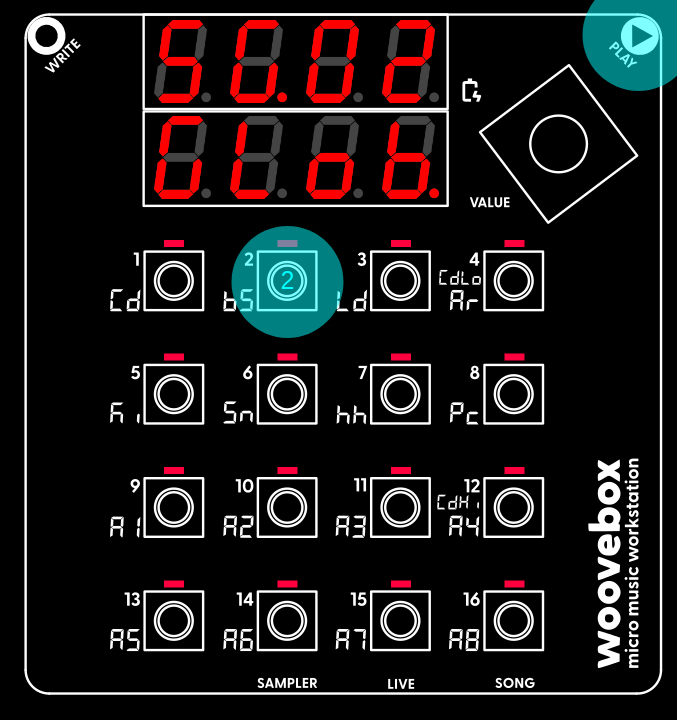
Select a different song to work on by holding Play and pressing 1-16.
If you wish to select a different song to work on, you can do so by holding play and pressing 1-16 to select song 1 through 16.
If you wish to start over with the currently selected song by resetting and clearing it, you can do so through the context menu;
- Hold write and short-press (a quick press no longer than one second) the value knob to cycle through the options until you find the "Init rand" menu item.
- Once found, long-press (a long press, longer than three seconds) the value knob to action the item. The song will be cleared and your Woovebox will report "Init oK".
- Release write to exit the context menu.
- All patterns are cleared, and tracks are initialized with random (but typically appropriate) presets to get you started quickly.
Note that these context menus are available in a number of different places around the Woovebox UI, and they all work in the same way. Please take note of how to use them, as they often hide handy features and functions.
You may also be interested in...
- Patterns / Pttn page (under Guides, tutorials and docs)
By default most tracks step through their patterns at a speed of 16 step (e.g. 4 beats, or one bar) per pattern.
- 1. AtK.1 Amplitude Envelope Generator Attack Oscillator 1 (under Amplitude page)
Attack defines the time it takes (in milliseconds) to ramp up from 0 full amplitude (attenuated by AEG.d).
- 4. KEy.t Filter cutoff frequency key tracking (under Filter page)
- 2. Cut.F Filter Cutoff (under Filter page)
- 3. rESo Resonance (under Filter page)
- Guides, tutorials and docs
- Learning the Woovebox
- The very basics
- Quick start tutorial and video
- Tempo and BPM
- Tracks
- Patterns
- Live pattern recording
- Conditional triggering and modification
- Chords
- Arpeggios
- Scales and modes
- Genres
- Patches and Presets
- Sound design
- Paraphonic parts
- Multi-instrument mode
- Risers, fallers, sweeps & ear candy
- Live mode
- Song mode
- Full song writing
- Sampler & vocoder
- Sidechaining, gating, ducking and compression
- Mastering
- Lo-fi & vintage analog and digital emulation
- Randomization
- Hall effect sensor playing
- Advanced techniques
- Undo
- Boot modes
- MIDI, Sync and connecting other gear
- Remote control expander mode
- Wireless MIDI
- Battery and charging
- Hardware quirks and limitations
- Understanding DSP load
- Looking after your Woovebox
- Firmware updates