- Guides, tutorials and docs
- Learning the Woovebox
- The very basics
- Quick start tutorial and video
- Tempo and BPM
- Tracks
- Patterns
- Live pattern recording
- Conditional triggering and modification
- Chords
- Arpeggios
- Scales and modes
- Genres
- Patches and Presets
- Sound design
- Paraphonic parts
- Multi-instrument mode
- Risers, fallers, sweeps & ear candy
- Live mode
- Song mode
- Full song writing
- Sampler & vocoder
- Sidechaining, gating, ducking and compression
- Mastering
- Lo-fi & vintage analog and digital emulation
- Randomization
- Hall effect sensor playing
- Advanced techniques
- Undo
- Boot modes
- MIDI, Sync and connecting other gear
- Remote control expander mode
- Wireless MIDI over Bluetooth
- Battery and charging
- Hardware quirks and limitations
- Understanding DSP load
- Looking after your Woovebox
- Firmware updates
- Quick start tutorial and video
- Set output volume
Set output volume
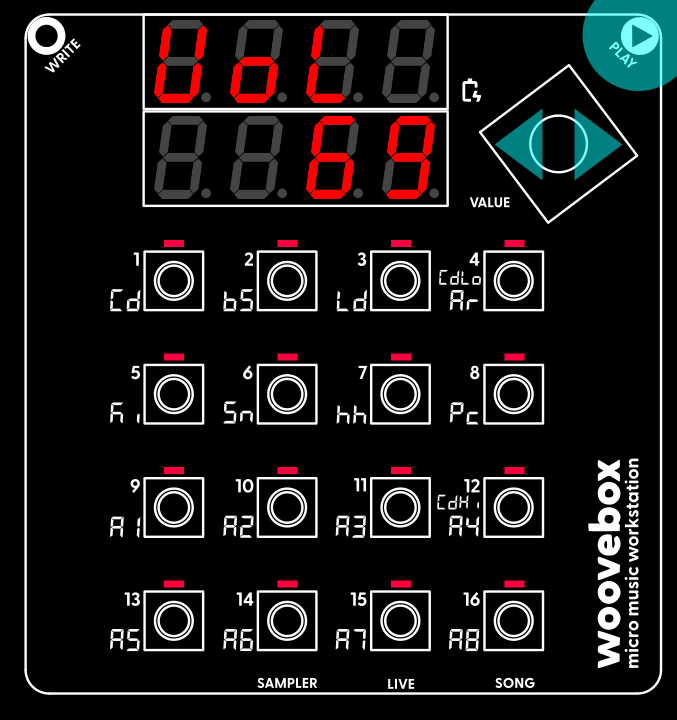
Hold Play and turn the Value knob to set the output volume to a comfortable level.
Hold play and turn the value knob left or right to set the output volume to a comfortable level. Press 1-16 to audition a sound to help you hear the difference in output levels. Your preferred output level will be saved on the next auto save event. You can adjust the output volume like this anywhere in the interface.
You may also be interested in...
- Method 2 (under Arpeggios)
If a sine wave is configured for the Pitch LFO with a depth of 2.0, the pitch will sweep the chord's note over two octaves.
- 2. LEvL oscillator output level (under Osc1 and Osc2 oscillator page)
- Setting up a MIDI connection (under Wooveconnect)
If using wireless MIDI, Wooveconnect will attempt to automatically detect your Woovebox and attach to the right ports.
- 6. L.1.de LFO1 depth (under Amplitude page)
Specifies the strength by which the LFO should affect the filter.
- 14. L.1.de LFO2 depth (under Amplitude page)
Specifies the strength by which the LFO should affect the filter.
- Guides, tutorials and docs
- Learning the Woovebox
- The very basics
- Quick start tutorial and video
- Tempo and BPM
- Tracks
- Patterns
- Live pattern recording
- Conditional triggering and modification
- Chords
- Arpeggios
- Scales and modes
- Genres
- Patches and Presets
- Sound design
- Paraphonic parts
- Multi-instrument mode
- Risers, fallers, sweeps & ear candy
- Live mode
- Song mode
- Full song writing
- Sampler & vocoder
- Sidechaining, gating, ducking and compression
- Mastering
- Lo-fi & vintage analog and digital emulation
- Randomization
- Hall effect sensor playing
- Advanced techniques
- Undo
- Boot modes
- MIDI, Sync and connecting other gear
- Remote control expander mode
- Wireless MIDI over Bluetooth
- Battery and charging
- Hardware quirks and limitations
- Understanding DSP load
- Looking after your Woovebox
- Firmware updates