- Guides, tutorials and docs
- Learning the Woovebox
- The very basics
- Quick start tutorial and video
- Tempo and BPM
- Tracks
- Patterns
- Live pattern recording
- Conditional triggering and modification
- Chords
- Arpeggios
- Scales and modes
- Genres
- Patches and Presets
- Sound design
- Paraphonic parts
- Multi-instrument mode
- Risers, fallers, sweeps & ear candy
- Live mode
- Song mode
- Full song writing
- Sampler & vocoder
- Sidechaining, gating, ducking and compression
- Mastering
- Lo-fi & vintage analog and digital emulation
- Randomization
- Hall effect sensor playing
- Advanced techniques
- Undo
- Boot modes
- MIDI, Sync and connecting other gear
- Remote control expander mode
- Wireless MIDI over Bluetooth
- Battery and charging
- Hardware quirks and limitations
- Understanding DSP load
- Looking after your Woovebox
- Firmware updates
- Quick start tutorial and video
- Set song BPM
Set song BPM
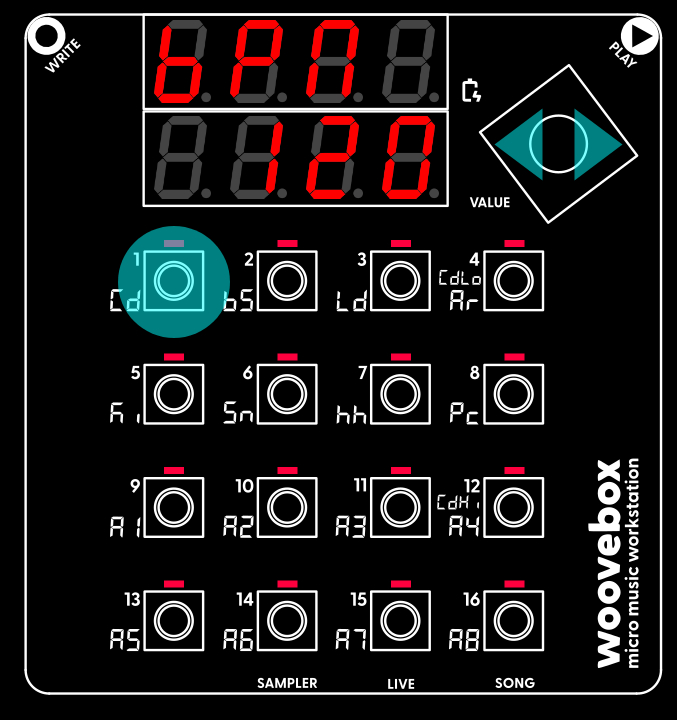
Set your new song's tempo (in beats-per-minute or "BPM"). In this case, the BPM setting lives under the 1/Cd button in Song (Global/"Glob") mode. To change a parameter or setting like "BPM";
- Hold the button 1-16 that corresponds to a parameter or setting; if a button has a lit up LED, then it has a parameter you can change.
- Still holding the 1-16 button, turn the value knob left or right to change the parameter or setting's value.
To discover more parameters and the values they are set to, simply short-press any 1-16 buttons that have their corresponding LED lit. Any buttons that do not have their LED lit, do not have a setting or parameter associated with them. To get a longer, 8-character description of a parameter or setting, long-press the button.
Changing parameters like this is done the exact same way across the entire UI. It provides you up to 16 parameters to change at once and avoids menu-diving.
For now, it is enough to know that your BPM setting flows through to the tempo and speed of many things. From the delay effects to LFO rates, and even automatic time stretching of samples; a change in BPM will never throw off any tempo-based aspects of your song. Everything adjusts automatically.
You may also be interested in...
- Multi-instrument mode (under Guides, tutorials and docs)
In simple terms, it allows a multi-instrument track to 'borrow' the instrument from any other track.
- Tempo and BPM (under Guides, tutorials and docs)
Everything syncs up throughout the synthesis engine, pattern playback and song mode.
- Full song writing on the Woovebox (under Guides, tutorials and docs)
Song mode is often an after-thought on other grooveboxes, but on your Woovebox, it is an integral part of its design.
- 5. Mu.Ln Mute length (under Patterns)
If 'Mu.Ln' + 'UM.Ln' does not the equal pattern length (Pt.Ln), interesting polymeters can eventuate.
- EFct (global song-wide multi-effects) page (under Song-wide settings)
This page houses settings for global song-wide multi-effects.
- Guides, tutorials and docs
- Learning the Woovebox
- The very basics
- Quick start tutorial and video
- Tempo and BPM
- Tracks
- Patterns
- Live pattern recording
- Conditional triggering and modification
- Chords
- Arpeggios
- Scales and modes
- Genres
- Patches and Presets
- Sound design
- Paraphonic parts
- Multi-instrument mode
- Risers, fallers, sweeps & ear candy
- Live mode
- Song mode
- Full song writing
- Sampler & vocoder
- Sidechaining, gating, ducking and compression
- Mastering
- Lo-fi & vintage analog and digital emulation
- Randomization
- Hall effect sensor playing
- Advanced techniques
- Undo
- Boot modes
- MIDI, Sync and connecting other gear
- Remote control expander mode
- Wireless MIDI over Bluetooth
- Battery and charging
- Hardware quirks and limitations
- Understanding DSP load
- Looking after your Woovebox
- Firmware updates