- Guides, tutorials and docs
- Learning the Woovebox
- The very basics
- Quick start tutorial and video
- Tempo and BPM
- Tracks
- Patterns
- Live pattern recording
- Conditional triggering and modification
- Chords
- Arpeggios
- Scales and modes
- Genres
- Patches and Presets
- Sound design
- Paraphonic parts
- Multi-instrument mode
- Risers, fallers, sweeps & ear candy
- Live mode
- Song mode
- Full song writing
- Sampler & vocoder
- Sidechaining, gating, ducking and compression
- Mastering
- Lo-fi & vintage analog and digital emulation
- Randomization
- Hall effect sensor playing
- Advanced techniques
- Undo
- Boot modes
- MIDI, Sync and connecting other gear
- Remote control expander mode
- Wireless MIDI over Bluetooth
- Battery and charging
- Hardware quirks and limitations
- Understanding DSP load
- Looking after your Woovebox
- Firmware updates
- Performing with Live mode
- Live jamming
Live jamming
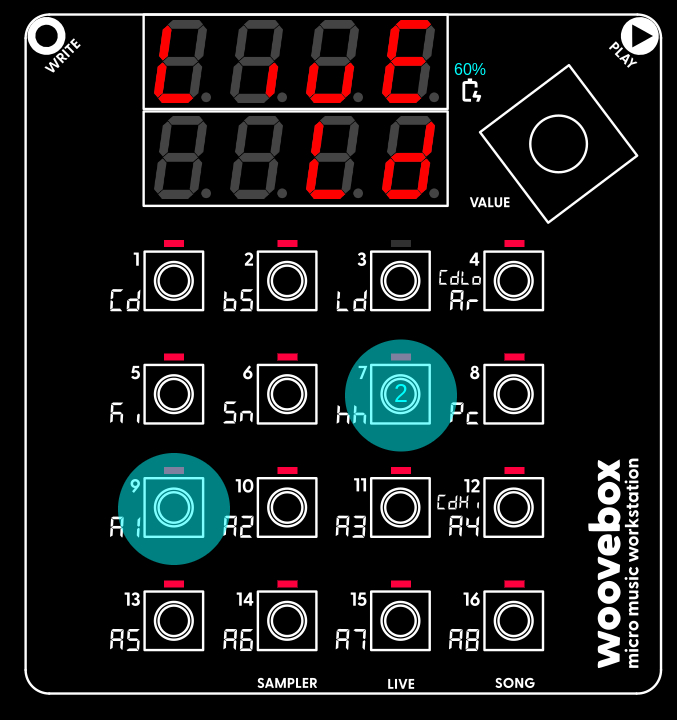
Despite its limitations, the Woovebox keyboard can be surprisingly expressive and very much suitable for live playing and improvising complex melodies.
Combined with legato, you can even dynamically create pitch glides; hold 1-16, then quickly play another 1-16 to slide from the first held 1-16 pitch to the second played 1-16 pitch. Note that to use glides, the patch needs to be configured to allow this. You can configure your patch on the 'Pich' (pitch) page; set Live Glide (LLGL) under 3/Ld to 'on'. Then set Legato Speed (LEG.S) under 7/hh to a value other than 0 to control the glide speed.
The way the keyboard translates key presses into note pitches, depends on how the FLW.C (follow chord) parameter on the 'Glob' (global) page is configured for your patch. For example, key presses may be automatically "pulled" toward the root note of the chord that is currently playing, or key presses may be automatically translated to the "legal" notes of the musical scale for your song. Please refer to the documentation to learn more about all the different modes at your disposal.
You may also be interested in...
- "Knight Rider" (1982) (remake) song SYX (under Example songs and patches .SYX files)
A track showing how a complex song that famously features equal parts vintage synth and real-world instruments, can be recreated in the Woovebox.
- Method 1 (under Arpeggios)
The way the track reacts to the current chord being played, determines how any steps are translated into note pitches.
- 9. CM.Th Compressor Threshold (under Dynamics)
Specifies a threshold (0-100) below which the track's compressor should kick in.
- Using a sample kit (under Using samples and kits in your songs)
To quickly and conveniently create a sample kit patch out of a kit; In the sampler, select the kit you want to use ("US.01"-"US.16").
- 5. QLty Spectral Quality (under Glob Gobal page)
Tracks with 'auto' set will always render at full ('FuLL') quality spectral resolution when exported via Wooveconnect.
- Guides, tutorials and docs
- Learning the Woovebox
- The very basics
- Quick start tutorial and video
- Tempo and BPM
- Tracks
- Patterns
- Live pattern recording
- Conditional triggering and modification
- Chords
- Arpeggios
- Scales and modes
- Genres
- Patches and Presets
- Sound design
- Paraphonic parts
- Multi-instrument mode
- Risers, fallers, sweeps & ear candy
- Live mode
- Song mode
- Full song writing
- Sampler & vocoder
- Sidechaining, gating, ducking and compression
- Mastering
- Lo-fi & vintage analog and digital emulation
- Randomization
- Hall effect sensor playing
- Advanced techniques
- Undo
- Boot modes
- MIDI, Sync and connecting other gear
- Remote control expander mode
- Wireless MIDI over Bluetooth
- Battery and charging
- Hardware quirks and limitations
- Understanding DSP load
- Looking after your Woovebox
- Firmware updates