- Sound design
- Wavetable Synthesis
Wavetable Synthesis
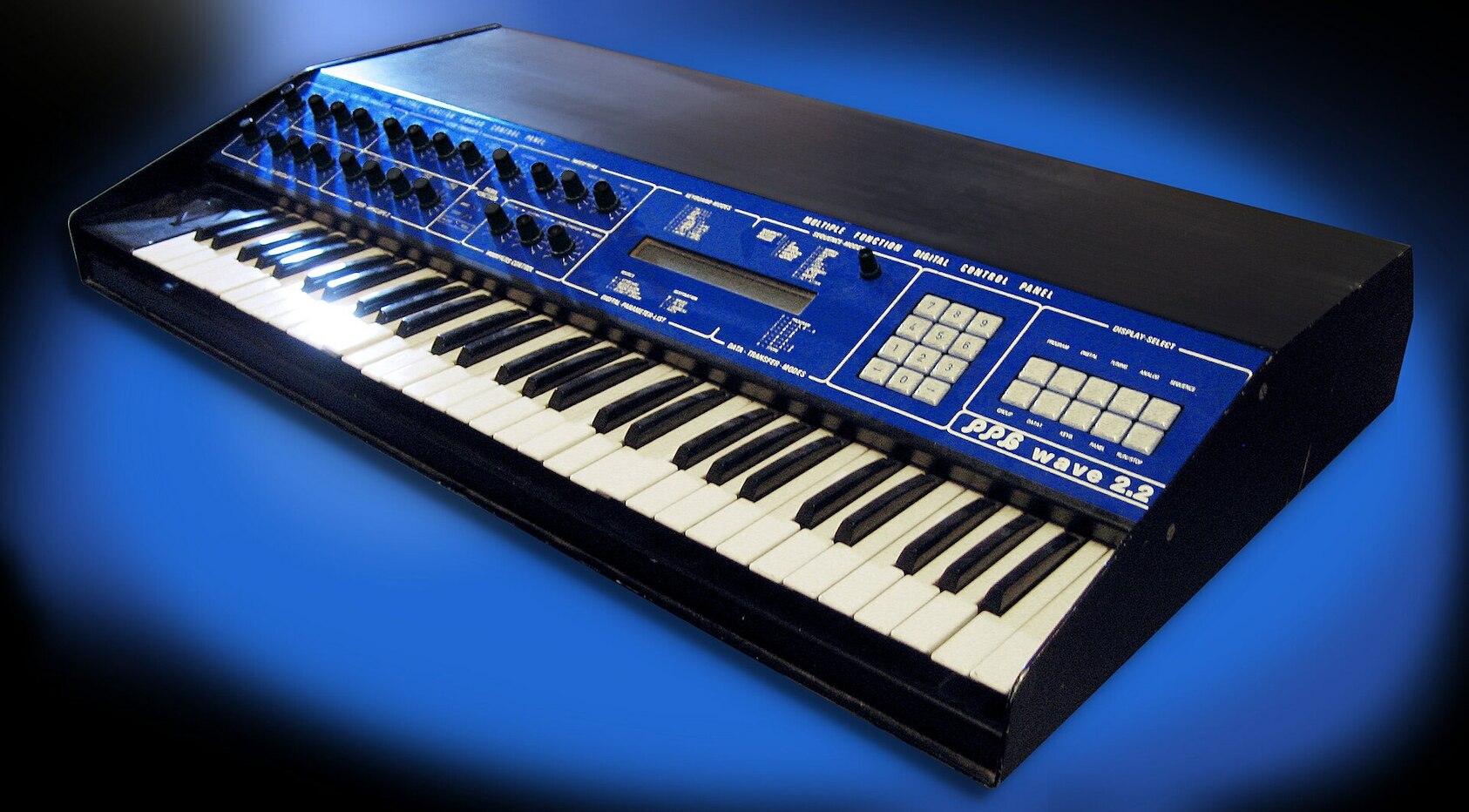
As of firmware 3.0, your Woovebox now includes wavetable synthesis.
Pioneered by Wolfgang Palm (PPG) in 1979 and further popularized by his successful Wave 2.x synthesizers, wavetable synthesis takes a limited number of single-cycle waveforms (often a collection of 64) and interpolates/"morphs" between them, over time, in different ways.
The wavetable synthesis sound is often characterized by complex evolving pads, metallic timbres, bells, grand/cinematic synth hits, voice-adjacent timbres, and - often - an overall distinctly cold and digital sound that does not shy away from aliasing or lo-fi grittiness.
The specific Woovebox implementation features;
- two wavetables oscillators per voice, sharing one scanning source and one amplitude modulation block
- eight built-in sets of 64 single-cycle tables
- custom wavetable support (compatible with many other wavetable synths that use the standard 32Kb / 8 x 8 x 256 sample single-cycle waveforms WAVs such as the ones produced by the WaveEdit software)
- scanning control signal via repurposed oscillator 2 amplitude modulation block, allowing for complex timbre changes via EG, LFO, key tracking and more
- regular use of all effects, filters, pitch LFOs and third sub/super oscillator
The preset category under 11/A3 on the 'Pach' page, exclusively contains Wavetable patches, while the patch randomizer is a veritable goldmine for new patches.
The sonic sweetspot for Woovebox wavetable patches are typically found in the medium-to-low ocataves, where the lower octaves can exhibit some extremely involved textures.
Wavetable Page
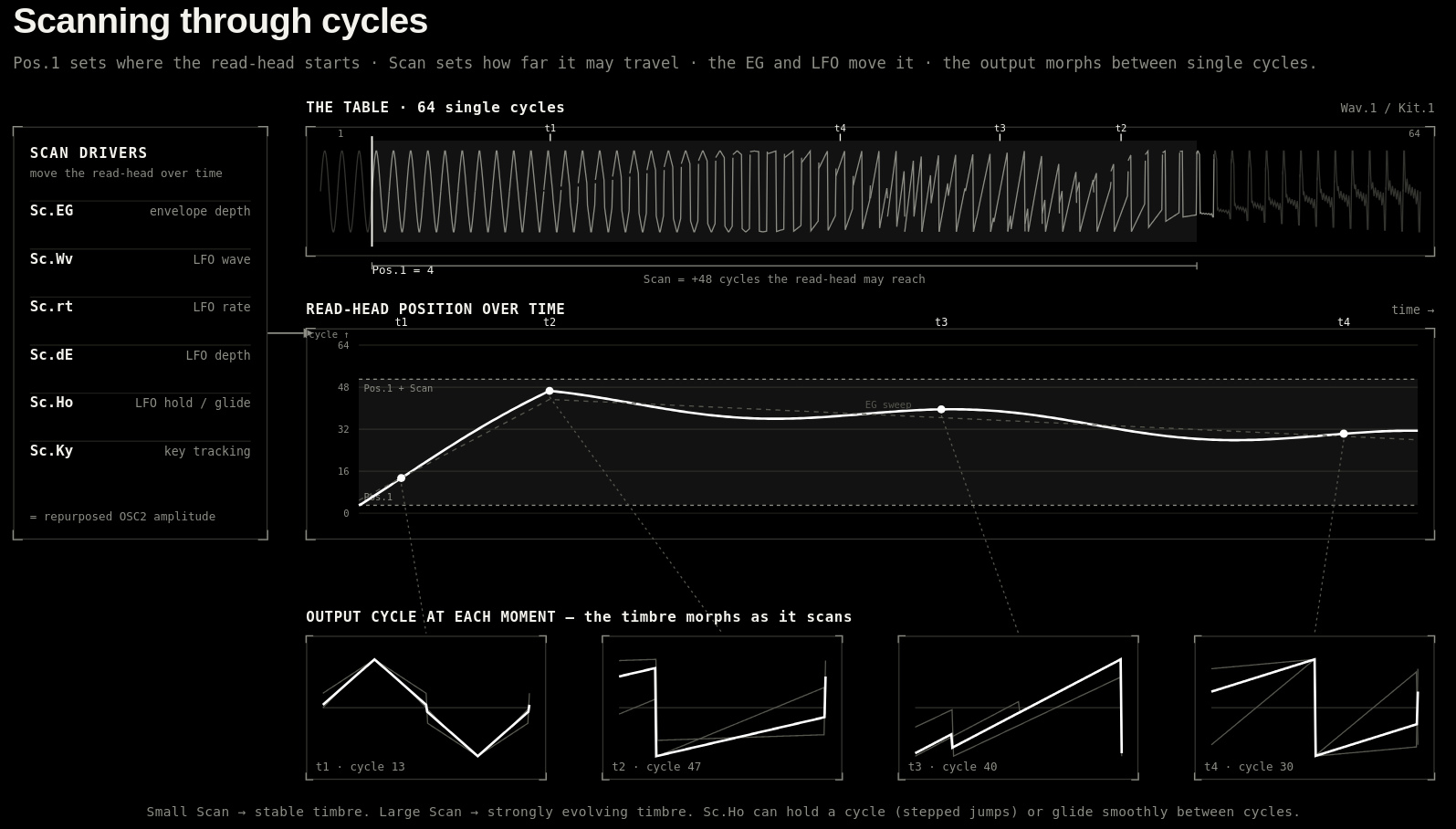
Wavetable synthesis is a somewhat different beast compared to most other synthesis algorithms on the Woovebox. Extensive table scanning controls (e.g. the way a patch scans/morphs through the table of waveforms) are rather important for a successful and versatile implementation.
To accomplish this, the Woovebox engine repurposes the amplitude of oscillator 2 for table scanning position duties. This means that anything that would normally control the amplitude signal of oscillator 2 (such as the level, amplitude envelope generator or amplitude LFO) is now redirected to the wavetable scanner. Some other parameters that are not (or less) useful for wavetable synthesis are also repurposed for more useful - though still related - duties (for example the phase start / Ph.St under 11/A3 on the Osc1/Osc2 pages now controls not the phase start, but rather the scan start position).
To avoid a lot of back-and-forth between pages, if the algorithm ('ALGo' under 3/Ld on a track's GLob page) is set to 'Wtab', a special wavetable page of parameters is inserted between the Amplitude ('AMPL') and Filter ('FLtr') pages.
This page replicates a number of useful parameters in one page, minimizing the need to scroll between pages. Please note however, that these sixteen parameters do not cover the full extent of tweakable wavetable parameters (notably the AEG2 attack/decay/sustain/release controls are absent from this page and must still be set on the Amplitude/'AMPL' page). Some of these parameters are renamed aliases for other parameters to better reflect their use in wavetable synthesis. For example, the scanning LFO is an alias for oscillator 2's amplitude LFO on the 'AMPL' page; they are really the same parameter, and changing one changes the other and vice versa. Please note that the hold-parameter-for-help Woovconnect documentation, will refer to the non-wavetable use of the parameter, and not the wavetable-specific repurposing/aliasing. For a wavetable-specific interpretation of the parameters, please use the wavetable page documentation.
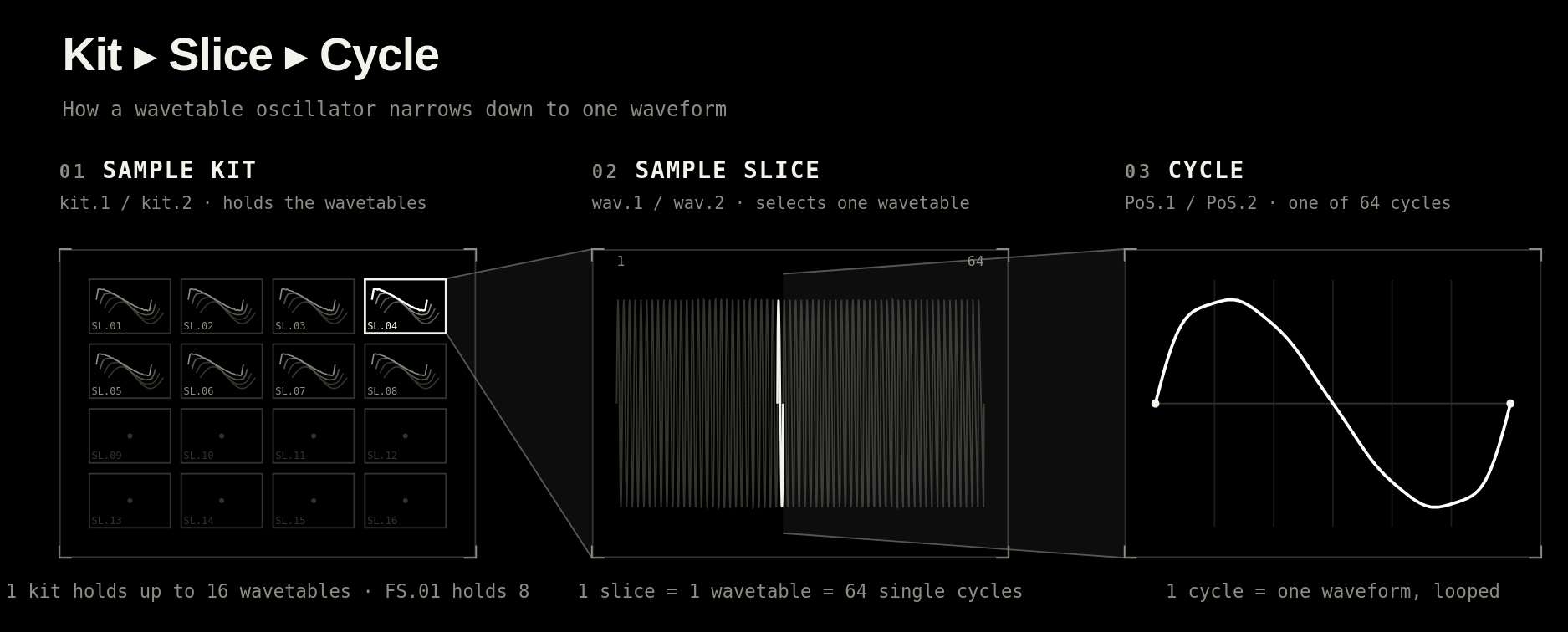
For its wavetable sources, the wavetable synthesis relies on standard 32Kb / 8 x 8 x 256 sample wavetables "samples". These "samples" exist as regular sample slices in one of the user kits or the factory kit (the latter contains 8 slices / wavetables). You may choose the kits by using 1/Cd/kit.1 or 5/Ki/kit.2 for oscillator 1 and oscillator 2 repsectively. Choosing a regular oscillator (for example 'Sqr1' or 'SSW4') instead of a FS.01 or US.01 - US.16 kit will yield unexpected results. The wavetable synthesis will still regard these waveforms as "sample material", slice these up into 64 cycles and scan between them accordingly. Similarly, picking non-wavetable material slices (2/bS/wav.1 or 6/Sn/wav.2) from the kits as "wavetables" will yield unexpected (but potentially interesting) results.
1. Kit.1 Wavetable Kit Select Oscillator 1
Selects the kit (factory kit FS.01 or user kit US.01-US.16 for custom wavetables) from where to draw sample material (slices) for the wavetables.
2. Wav.1 Wavetable Select Oscillator 1
Selects the slice (SL.01 - SL.16) of the kit specified under Kit.1 that contains a usable wavetable. Note that for the factory kit (FS.01) the first eight (SL.01 - SL.08) contain usable wavetables.
4. PoS.1 Waveform Start Position Oscillator 1
Waveform index number start position for oscillator 1. This is the waveform number (out of 64) where scanning should start.
5. Kit.2 Wavetable Kit Select Oscillator 2
Selects the kit (factory kit FS.01 or user kit US.01-US.16 for custom wavetables) from where to draw sample material (slices) for the wavetables.
6. Wav.2 Wavetable Select Oscillator 2
Selects the slice (SL.01 - SL.16) of the kit specified under Kit.2 that contains a usable wavetable. Note that for the factory kit (FS.01) the first eight (SL.01 - SL.08) contain usable wavetables.
8. Pos.2 Waveform Start Position Oscillator 2
Waveform index number start position for oscillator 2. This is the waveform number (out of 64) where scanning should start.
9. Scan Scan Level
Governs the maximum amount of waveforms that may be scanned ahead, starting from the starting position (Pos.1 and Pos.2 parameters). Use small amounts for more stable timbres, use larger amounts for strongly evolving/changing timbres.
10. bLnc Oscillator 1/2 Balance
Specifies how much oscillator 1 should be audible vs oscillator 2 (mix).
11. Sc.EG Scan Envelope Generator Depth
Alias for AEG2 depth ('AEGd' under 5/Ki on Osc2 page). Specifies how much the envelope generator should affect the scanning position (versus, for example, the LFO) and whether this influence should be exponential or linear.
12. Sc.Ky Scan Key Tracking
Alias for Amplitude Key Tracking depth ('A.Ky.t' under 8/Pc on Osc2 page). This setting allows the note pitch to influence the scanning position, thereby varying the timbre depending on the played note.
13. Sc.Wv Scan LFO Wave
Alias for Amplitude LFO 2 ('L.2.Wv' under 13/A5 on the 'AMPL' page). Sets the waveform of the LFO that affects the scan position over time.
14. Sc.dE Scan LFO Depth
Alias for Amplitude LFO 2 ('L.2.dE' under 14/A6 on the 'AMPL' page). Governs how much the LFO should affect the scan position over time. Higher depths create deeper changes to the timbre.
15. Sc.rt Scan LFO Rate
Alias for Amplitude LFO 2 ('L.2.rt' under 15/A7 on the 'AMPL' page). Governs how fast the LFO should affect the scan position over time. Faster speeds create faster changes to the timbre.
16. Sc.Ho Scan LFO Hold
Alias for Amplitude LFO 2 ('L.2.Ho' under 16/A8 on the 'AMPL' page).
- If positive value, governs how long the LFO should hold a timbre. Using the hold value like this can effect audible "jumps" in timbre.
- If negative value, governs how long it takes to interpolate from one hold value to the next. Using the hold value like this will cause smooth changes in timbre that can follow complex (or even random!) patterns.
TIP: to create ever evolving timbres that random change timbre, use a noise waveform combined with a negative hold value.
This is an overview of the built-in tables, their use-cases and their waveform visualisations.
You may also be interested in...
- Terms, Conditions and Warranty (under Shop)
- Firmware revision history (under Firmware updates)
This file can be opened in any text editor and details a full history of fixes, enhancements and new features since release.
- Transients (under General workflow recommendation)
Transient shaping is changing that attack without changing the whole sound too much.
- Lo-fi & vintage analog and digital emulation (under Full documentation, guide and tutorial)
Here too, the sounds your Woovebox produces can be made to - just like the vintage analog drum computers - never be 100% the same on every trigger.
- Chorus (under Global Send Multi-effects)
The chorus unit on your Woovebox allows for thickening up a sound, or even add an "overflying fighter jet"-like quality to a sound.