- Sound design
- Architecture
- Oscillators
- Algorithms
- Low Frequency Oscillators (LFOs)
- Envelope generators
- Filters
- Amplitude modulation
- Pitch modulation
- Panning & EQ
- Dynamics, Sidechaining, Gating, Ducking, Compression and Transient Shaping
- Distortion, Saturation, Bit-crushing
- Global Send Multi-effects
- DJ FX
- Wavetable Synthesis
- A word about authenticity
Reverb
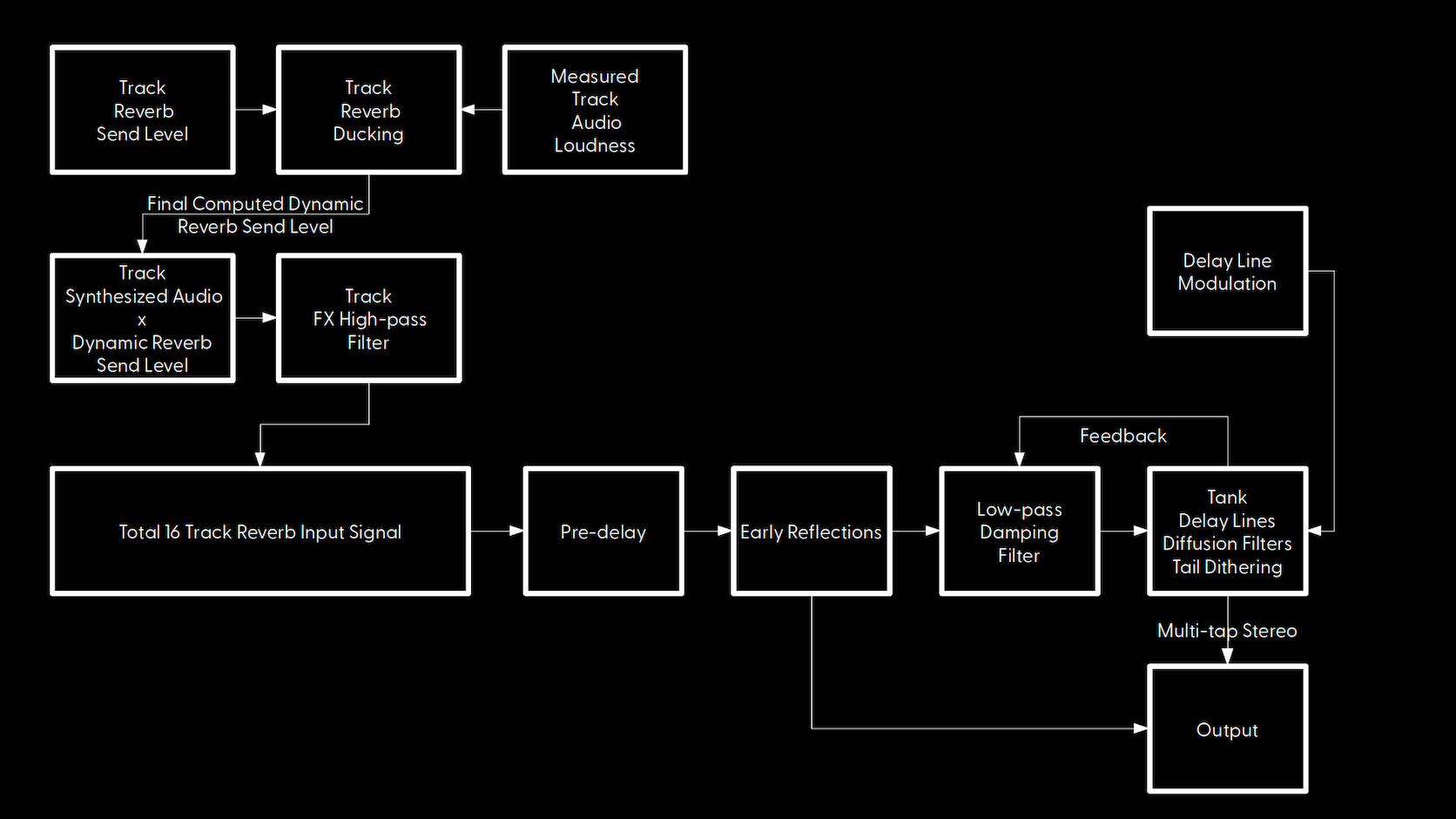
Your Woovebox comes with a versatile, high quality reverb effect, with special attention to fitting well in a finished mix.
It provides a lush sound with controllable feedback, pre-delay, damping and modulation ("haze"), plus early reflection simulation and tail noise shaping, without metallic artifacts or obvious repeats in tails.
In this reverb design, feedback (13/A5/rv.Fb) primarily controls how large the space is that is being simulated from 0 (tiny) to 127 (huge).
Damping (14/A6/rv.dM) controls how full or empty the space is with absorbers (for example carpet, curtains). It simulates how real rooms and spaces "eat" high frequencies. A "pass" value will not absorb any high frequencies and sound almost shimmery and ethereal. Settings other than "pass", show the frequency above which high frequencies are attenuated ("absorbed").
Pre-delay (15/A7/rv.P.d) ensures a sound sent to the reverb has some time (specified in milliseconds) to play its attack transient before its reverb counterpart kicks in. This allows sounds to punch through in the mix before they - potentially - get lost in their own reverb.
Finally, modulation (16/A8/rv.Md) specifies an optional modulation/turbulence depth for the delay lines to simulate atmospheric phenomenon such as air temperature, humidity and moving air. Higher value can convey the (imaginary) sound and shimmer of "heat haze".
Local and global reverb ducking
Per-track, the final reverb send level for the track may be dynamically reduced/"ducked" (14/A6/rv.dU on a track's dyna page) based on the track's output volume. This ensures a sound playing on a track is not drowned out by its own reverb. Its reverb tail only becomes progressively audible once the track itself stops playing a sound.
Per-track, the total global reverb signal may also be influenced in the same manner by a global ducking setting (13/A5/Gb.du on a track's dyna page). This is useful if you need to make sure a track's sound is not lost/drowned out by the effects (such as reverb). Note that this setting also affects delay 1. For example, this is useful when you need to make sure a kick is audible when an - otherwise - overwhelming reverb is sounding at the same time.
Both local and global ducking use the per-track compessor's attack (11/A3/CM.At on a track's dyna page) and release (12/A4/CM.rL on a track's dyna page) times.
High-pass filter before send FX
To avoid low frequency build-up ("mud") in the reverb tail, you can use the high-pass filter under 7/hh/EF.HP on the Pan & EQ ("PnEq") page. This setting filters low frequencies out a track's audio, before sending it to the reverb and delay effects.
You may also be interested in...
- 4. Ch.rP Chain Repeat (under Patterns)
Specifies how many times the current pattern should play before switching to the next pattern (as specified by Ch.nE).
- Dynamics, Sidechaining, Gating, Ducking, Compression and Transient Shaping (under Sound design)
- Distortion, Saturation, Bit-crushing (under Sound design)
Each track has its own configurable distortion (choice of clipping or folding distortion), saturation and bit-crushing effects.
- Performing with the Live and Scene modes (under Live mode)
To schedule a scene transition, hold play and long-press key 1-16 to schedule scene 1-16.
- Fragments; arranging and building your song (under Song mode)
You can now create and edit the first fragment (fragment 01) of your song.
- Sound design
- Architecture
- Oscillators
- Algorithms
- Low Frequency Oscillators (LFOs)
- Envelope generators
- Filters
- Amplitude modulation
- Pitch modulation
- Panning & EQ
- Dynamics, Sidechaining, Gating, Ducking, Compression and Transient Shaping
- Distortion, Saturation, Bit-crushing
- Global Send Multi-effects
- DJ FX
- Wavetable Synthesis
- A word about authenticity