- Full documentation, guide and tutorial
- Learning the Woovebox
- The very basics
- Quick start tutorial
- Tempo and BPM
- Tracks
- Patterns
- Live pattern recording
- Conditional triggering and modification
- Chords
- Arpeggios
- Scales and modes
- Genres
- Patches and Presets
- Sound design
- DNA dynamic patch cross-breeding
- Paraphonic parts
- Multi-instrument mode
- Risers, fallers, sweeps & ear candy
- Live mode
- Song mode
- Full song writing
- Sampler & vocoder
- Mixing & Mastering
- Lo-fi & vintage analog and digital emulation
- Randomization
- Hall effect sensor playing
- Advanced techniques
- Undo
- Boot modes
- Connecting other gear; MIDI, Sync, and audio pass-through
- Remote control expander mode
- Wireless MIDI over Bluetooth
- Connecting Bluetooth typing keyboard/touchpad
- Battery and charging
- Hardware quirks and limitations
- Understanding DSP load
- Looking after your Woovebox
- Firmware updates
- The very basics
- 16 x 16 x 16 x 16
16 x 16 x 16 x 16
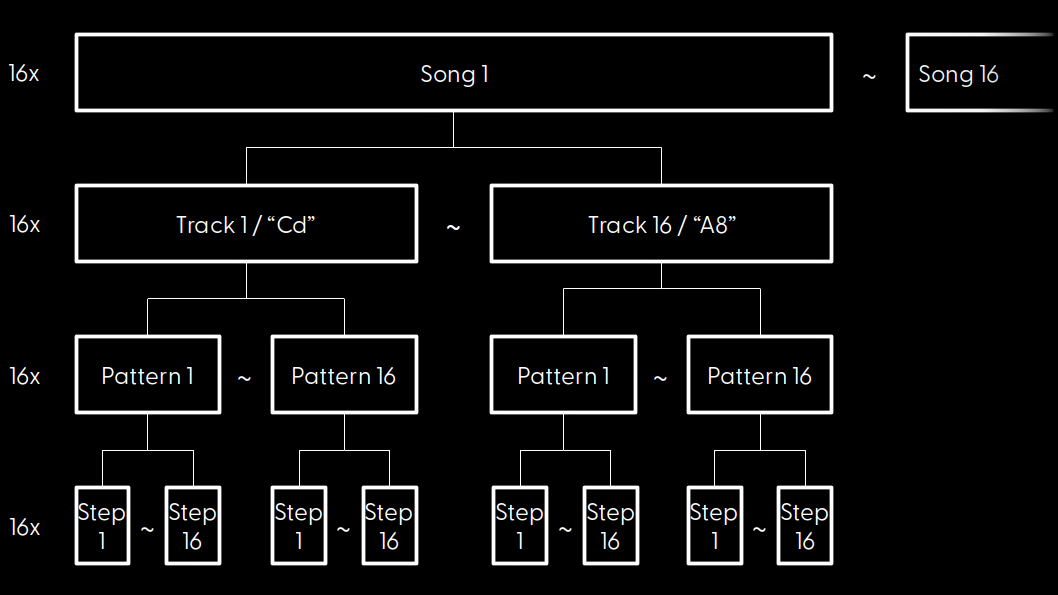
Your Woovebox holds 16 songs. Each song has 16 tracks. Each track has its own 16 patterns. Each pattern is made up of 16 steps.
While just 16 patterns x 16 steps (= 256 steps max.) for each track per song seems very limiting at first glance, you will quickly come to learn that what appears to be a limitation, is actually one of the Woovebox' core strengths.
That is because, amazingly, even just a single 16-step pattern for each track is enough to create a full, complex-sounding song; it is very important to take note of how the Woovebox, contrary to many other grooveboxes, gives you 16 individual patterns per track. Many other devices swap this, and often give you a number of tracks per pattern. This pattern independence from the tracks, allows you to mix and match what your tracks are playing in your final song independently.
You may also be interested in...
- macOS (under Pairing your Woovebox to a host)
If you have trouble connecting, please see if your Woovebox already exists under Bluetooth devices.
- Cheat sheet (under Documentation)
These are the absolute essentials you need to operate your Woovebox.
- Amplitude page (under Amplitude modulation)
- Amplitude modulation (under Sound design)
- Build up more elements (under Quick start tutorial)
- Full documentation, guide and tutorial
- Learning the Woovebox
- The very basics
- Quick start tutorial
- Tempo and BPM
- Tracks
- Patterns
- Live pattern recording
- Conditional triggering and modification
- Chords
- Arpeggios
- Scales and modes
- Genres
- Patches and Presets
- Sound design
- DNA dynamic patch cross-breeding
- Paraphonic parts
- Multi-instrument mode
- Risers, fallers, sweeps & ear candy
- Live mode
- Song mode
- Full song writing
- Sampler & vocoder
- Mixing & Mastering
- Lo-fi & vintage analog and digital emulation
- Randomization
- Hall effect sensor playing
- Advanced techniques
- Undo
- Boot modes
- Connecting other gear; MIDI, Sync, and audio pass-through
- Remote control expander mode
- Wireless MIDI over Bluetooth
- Connecting Bluetooth typing keyboard/touchpad
- Battery and charging
- Hardware quirks and limitations
- Understanding DSP load
- Looking after your Woovebox
- Firmware updates