- Full documentation, guide and tutorial
- Learning the Woovebox
- The very basics
- Quick start tutorial
- Tempo and BPM
- Tracks
- Patterns
- Live pattern recording
- Conditional triggering and modification
- Chords
- Arpeggios
- Scales and modes
- Genres
- Patches and Presets
- Sound design
- DNA dynamic patch cross-breeding
- Paraphonic parts
- Multi-instrument mode
- Risers, fallers, sweeps & ear candy
- Live mode
- Song mode
- Full song writing
- Sampler & vocoder
- Mixing & Mastering
- Lo-fi & vintage analog and digital emulation
- Randomization
- Hall effect sensor playing
- Advanced techniques
- Undo
- Boot modes
- Connecting other gear; MIDI, Sync, and audio pass-through
- Remote control expander mode
- Wireless MIDI over Bluetooth
- Connecting Bluetooth typing keyboard/touchpad
- Battery and charging
- Hardware quirks and limitations
- Understanding DSP load
- Looking after your Woovebox
- Firmware updates
- Full documentation, guide and tutorial
- Wireless MIDI over Bluetooth
Wireless MIDI over Bluetooth
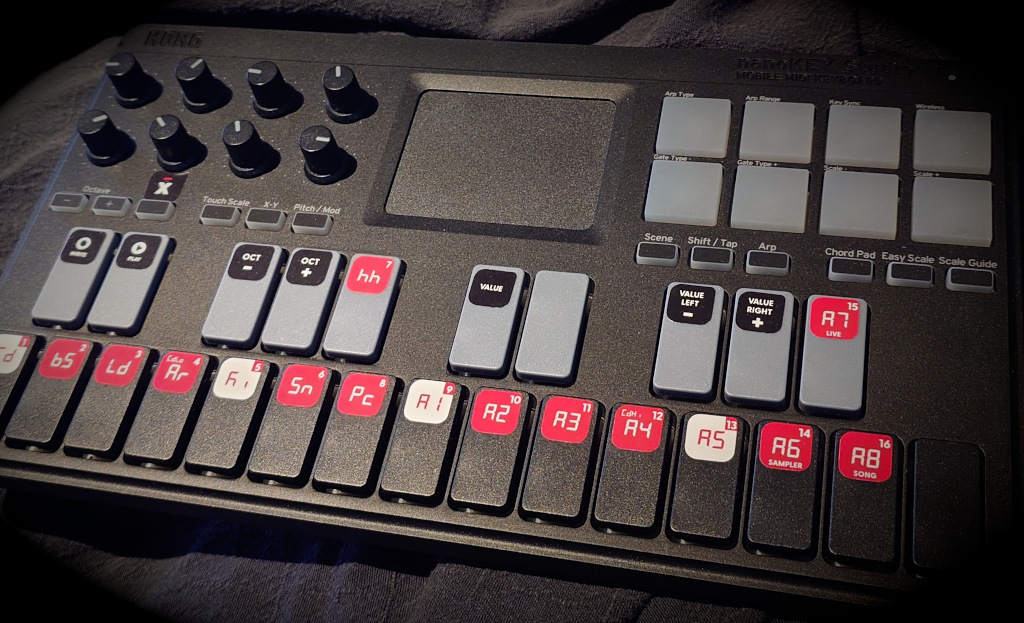
Your Woovebox supports MIDI in and out over Bluetooth® LE (Low Energy), allowing it to communicate with almost any MIDI over Bluetooth device, such as MIDI controllers, phones, tablets, DAWs as well as the Wooveconnect service and app.
Peripheral mode
Peripheral mode is the most common mode for MIDI over BLE gear, where a device connects to a host (such as a phone, table, laptop or desktop).
To start your Woovebox with Bluetooth peripheral mode enabled, keep the 1/Cd (or 2/bS for enhanced compatibility mode, or 3/Ld for high-speed mode) key pressed while switching on the device. The display reads 'boot bLE' (or 'safE bLE' or 'FaSt bLE').
You can now use your Woovebox with a host device, and use the Wireless MIDI and data transfer capabilities.
Central ("host") mode
Your Woovebox is among the select few devices on the market that can act as a host for other devices to connect to. This means that you can connect most Wireless MIDI peripherals to your Woovebox. You can even connect another Woovebox to your Woovebox and transfer back and forth data, sync their playback, etc.
To start your Woovebox in Bluetooth central ("host") mode, keep the 4/Ar key pressed while switching on the device. The display reads 'hoSt bLE'.
Once your device has booted up, you can proceed to turn on your peripheral (or your peripheral's Bluetooth function). Your Woovebox will automatically attempt to connect to any available peripheral device it detects.
One device at a time
Please remember that your Woovebox can only connect to one device at a time; if you need to connect to a device, please make sure your Woovebox is disconnected from any other device first.
Pairing your Woovebox to a host
After the pairing procedure for your particular operating system, your Woovebox can be used as a regular MIDI device within other applications, or can be managed through the Wooveconnect app.
Your host device's BLE radio needs to be BLE 4.0 compatible, and please make sure that your Woovebox is not already accidentally connected to some other device; it can only handle one connection at a time and will not be visible to any other devices while it is already connected.
Please make sure any Battery Saver mode that may interfere with Bluetooth is off (Android, iOS, and Windows Power Management).
The stability of your MIDI over BLE connection is heavily dependent the quality of the drivers and quality operating system's Bluetooth stack. Unfortunately this quality can be found lacking on various hardware/OS combinations from Microsoft, Google and Apple. If you require a rock solid plug & play MIDI over BLE solution that works on any machine, we recommend the WIDI Bud Pro solution by CME.
By far the easiest and most stable MIDI over BLE solution, is to use a WIDI Bud Pro USB adapter that was specifically designed to provide a rock-solid connection for musicians and performers.
Most modern Linux distros allow you to pair with your Woovebox, after which it can be used system-wide as an input and output MIDI device automatically.
MacOS users can use the built-in MIDI over BLE support.
Though likely to work on many systems, Windows 11 is not officially supported by Woovebox due to dependency on third party drivers, as Windows is the only operating system that does not natively expose MIDI over BLE devices to applications such as your browser.
Please use the Wooveconnect app in the Google Play store. Wooveconnect for Android works on Android 9+.
Most iOS software will detect your Woovebox. For any apps that don't however, you can use a utility app like Bluetooth MIDI Connect to connect your Woovebox to these apps.
You may also be interested in...
- 16 x 16 x 16 x 16 (under The very basics)
Many other devices swap this, and often give you a number of tracks per pattern.
- With ducking (under Example)
- Gating by a dedicated gate track (under Example)
- Gating off (under Example)
- Example (under Gating)
- Full documentation, guide and tutorial
- Learning the Woovebox
- The very basics
- Quick start tutorial
- Tempo and BPM
- Tracks
- Patterns
- Live pattern recording
- Conditional triggering and modification
- Chords
- Arpeggios
- Scales and modes
- Genres
- Patches and Presets
- Sound design
- DNA dynamic patch cross-breeding
- Paraphonic parts
- Multi-instrument mode
- Risers, fallers, sweeps & ear candy
- Live mode
- Song mode
- Full song writing
- Sampler & vocoder
- Mixing & Mastering
- Lo-fi & vintage analog and digital emulation
- Randomization
- Hall effect sensor playing
- Advanced techniques
- Undo
- Boot modes
- Connecting other gear; MIDI, Sync, and audio pass-through
- Remote control expander mode
- Wireless MIDI over Bluetooth
- Connecting Bluetooth typing keyboard/touchpad
- Battery and charging
- Hardware quirks and limitations
- Understanding DSP load
- Looking after your Woovebox
- Firmware updates