- Full documentation, guide and tutorial
- Learning the Woovebox
- The very basics
- Quick start tutorial
- Tempo and BPM
- Tracks
- Patterns
- Live pattern recording
- Conditional triggering and modification
- Chords
- Arpeggios
- Scales and modes
- Genres
- Patches and Presets
- Sound design
- DNA dynamic patch cross-breeding
- Paraphonic parts
- Multi-instrument mode
- Risers, fallers, sweeps & ear candy
- Live mode
- Song mode
- Full song writing
- Sampler & vocoder
- Mixing & Mastering
- Lo-fi & vintage analog and digital emulation
- Randomization
- Hall effect sensor playing
- Advanced techniques
- Undo
- Boot modes
- Connecting other gear; MIDI, Sync, and audio pass-through
- Remote control expander mode
- Wireless MIDI over Bluetooth
- Connecting Bluetooth typing keyboard/touchpad
- Battery and charging
- Hardware quirks and limitations
- Understanding DSP load
- Looking after your Woovebox
- Firmware updates
- Remote control expander mode
- Mapping
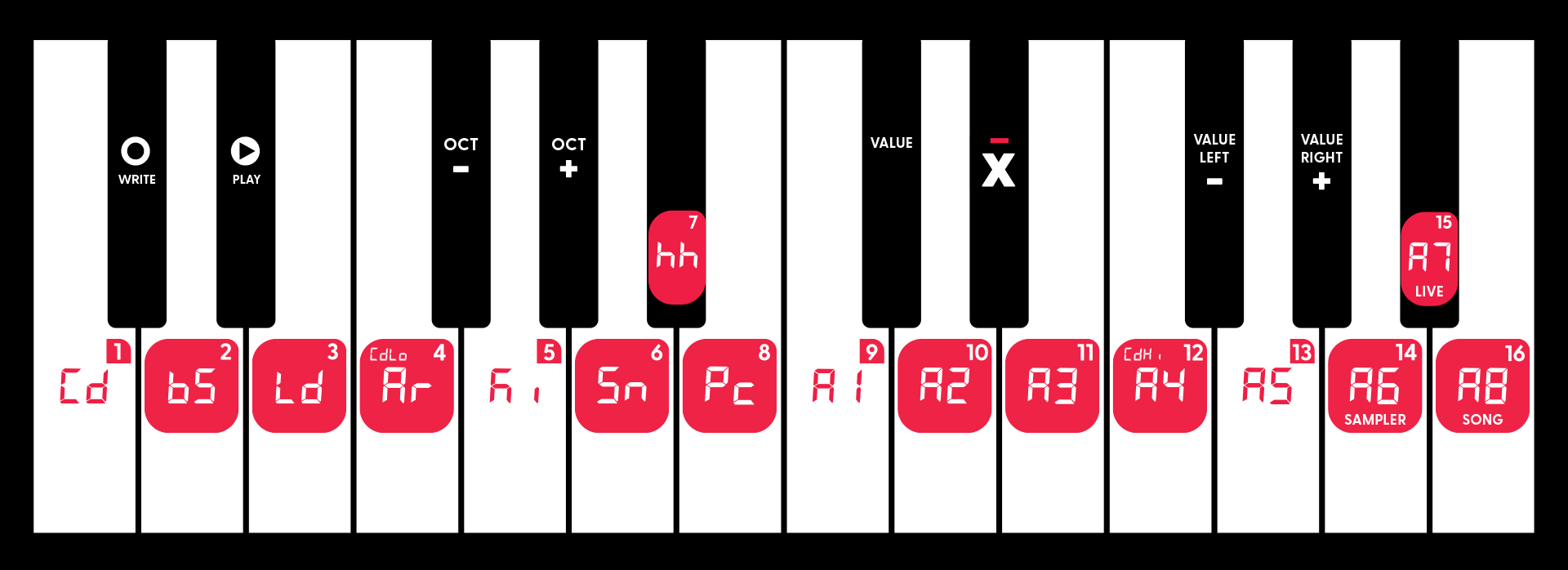
Mapped range
While remote control is active, 24 MIDI notes (2 octaves) from your keyboard or controller are used to control your Woovebox. Outside of those two octaves, your keyboard or controller will work as normal.
Positions
On first use of the remote control feature, your Woovebox automatically detects which two octaves (out of five possible positions across the keyboard) should be "sacrificed" for remote control. From thereon, only those two octaves respond to remote control messages. Using this mechanism, your Woovebox can be configured for control from the following positions on the keyboard (assuming MIDI note 60 being C4 / "middle C");
- C-1 to B0 (MIDI notes 0-23)
- C1 to B2 (MIDI notes 24-47)
- C3 to B4 (MIDI notes 48-71)
- C5 to B6 (MIDI notes 72-95)
- C7 to B8 (MIDI notes 96-119)
1st octave
C
1/Cd
C#
write
D
2/bS
D#
play
E
3/Ld
F
4/Ar
F#
octave - / decrement
G
5/Ki
G#
octave + / increment
A
6/Sn
A#
7/hh
B
8/Pc
2nd octave
C
9/A1
C#
value
D
10/A2
D#
(no function)
E
11/A3
F
12/A4
F#
value left / -
G
13/A5
G#
value right / +
A
14/A6
A#
15/A7
B
16/A8
Additional MIDI mapping
If your keyboard or controller has a pitch bend control, turning the value knob rapidly can be emulated by repeatedly pitching up (corresponding to turning left) or down (corresponding to turning right).
Simulated single value knob left and right detents ("clicks") are mapped to CC#97 ("Data Button Decrement") and CC#96 ("Data Button Increment") respectively. Any accompanying value is ignored. For reasons of MIDI implementation conformity, these controls work even if remote control expander mode is turned off.
Simulated single value knob left and right detents ("clicks") are also mapped to CC#85 and CC#84 respectively. Any accompanying value for these controls is not ignored; a value of >= 64 signifies a press, and a value of <=63 signifies a release.
As said, CC#80 replicates the sustain pedal mechanic and puts the Woovebox in remote control expander mode. If you wish to avail of this mapping, you may wish to configure your controller's button - if possible - to act like latching/"toggle" button so that a single press "holds" the mode until it is pressed again to exit the mode.
Simulated Woovebox play button, write button and value knob presses are additionally mapped to CC#81, CC#82, and CC#83 respectively, where a value of >= 64 signifies a press, and a value of <=63 signifies a release. If you wish to avail of this mapping, configure your controller's buttons - if possible - to act like momentary, rather than latching/"toggle" buttons. For your convenience, using these controller numbers automatically puts your Woovebox in remote control expander mode for the duration of the press (e.g. acting as if CC#80 or the sustain pedal were pressed at the same time as well).
Please note it is important to properly release controls mapped to CC#80 - CC#85, by sending a value <= 63 (button/control released). If you do not require the Woovebox to register a button or control being pressed in (held down) first (e.g. you wish to mimic a quick momentary tap), you may send a value <=63 immediately, rather than sending a >= 64 value first.
You may also be interested in...
- Download remote control "expanded" sticker sheet PDF (under Downloads & Community)
Downloadable PDF version of the sticker sheets for remote control expander mode.
- Dynamics, Sidechaining, Gating, Ducking, Compression and Transient Shaping (under Sound design)
- Analog sync (under Connecting other gear; MIDI, Sync, and audio pass-through)
Even today, analog sync pulses are a popular way to start, stop and synchronize playback of other gear.
- Advanced techniques (under Full documentation, guide and tutorial)
Learn to use the Woovebox to its fullest potential and bring your music production to the next level!
- Risers, fallers, sweeps & ear candy (under Full documentation, guide and tutorial)
Risers and fallers are sound effects used in music production to create a sense of tension or release.
- Full documentation, guide and tutorial
- Learning the Woovebox
- The very basics
- Quick start tutorial
- Tempo and BPM
- Tracks
- Patterns
- Live pattern recording
- Conditional triggering and modification
- Chords
- Arpeggios
- Scales and modes
- Genres
- Patches and Presets
- Sound design
- DNA dynamic patch cross-breeding
- Paraphonic parts
- Multi-instrument mode
- Risers, fallers, sweeps & ear candy
- Live mode
- Song mode
- Full song writing
- Sampler & vocoder
- Mixing & Mastering
- Lo-fi & vintage analog and digital emulation
- Randomization
- Hall effect sensor playing
- Advanced techniques
- Undo
- Boot modes
- Connecting other gear; MIDI, Sync, and audio pass-through
- Remote control expander mode
- Wireless MIDI over Bluetooth
- Connecting Bluetooth typing keyboard/touchpad
- Battery and charging
- Hardware quirks and limitations
- Understanding DSP load
- Looking after your Woovebox
- Firmware updates