- Full documentation, guide and tutorial
- Learning the Woovebox
- The very basics
- Quick start tutorial
- Tempo and BPM
- Tracks
- Patterns
- Live pattern recording
- Conditional triggering and modification
- Chords
- Arpeggios
- Scales and modes
- Genres
- Patches and Presets
- Sound design
- DNA dynamic patch cross-breeding
- Paraphonic parts
- Multi-instrument mode
- Risers, fallers, sweeps & ear candy
- Live mode
- Song mode
- Full song writing
- Sampler & vocoder
- Mixing & Mastering
- Lo-fi & vintage analog and digital emulation
- Randomization
- Hall effect sensor playing
- Advanced techniques
- Undo
- Boot modes
- Connecting other gear; MIDI, Sync, and audio pass-through
- Remote control expander mode
- Wireless MIDI over Bluetooth
- Connecting Bluetooth typing keyboard/touchpad
- Battery and charging
- Hardware quirks and limitations
- Understanding DSP load
- Looking after your Woovebox
- Firmware updates
- Quick start tutorial
- Set song BPM
Set song BPM
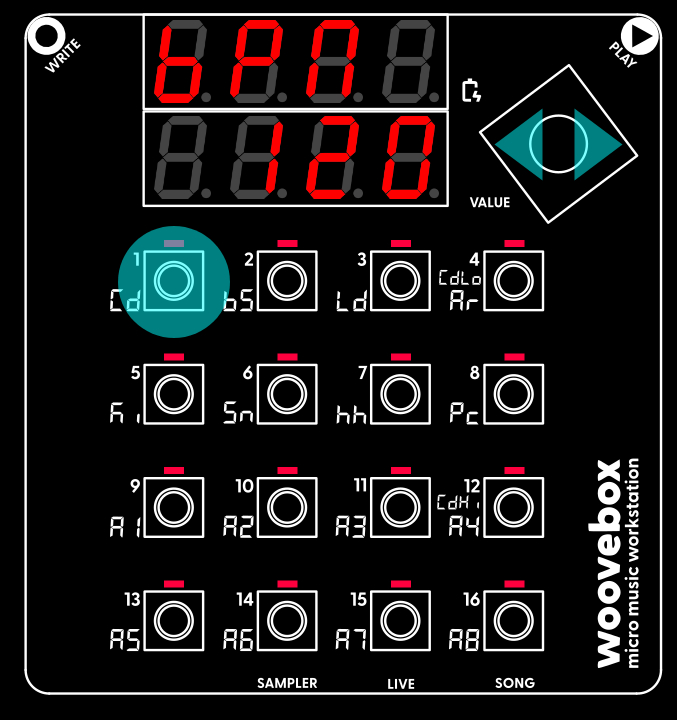
Set your new song's tempo (in beats-per-minute or "BPM"). In this case, the BPM setting lives under the 1/Cd button in Song (Global/"Glob") mode. To change a parameter or setting like "BPM";
- Hold the button 1-16 that corresponds to a parameter or setting; if a button has a lit up LED, then it has a parameter you can change.
- Still holding the 1-16 button, turn the value knob left or right to change the parameter or setting's value.
To discover more parameters and the values they are set to, simply short-press any 1-16 buttons that have their corresponding LED lit. Any buttons that do not have their LED lit, do not have a setting or parameter associated with them. To get a longer, 8-character description of a parameter or setting, long-press the button.
Changing parameters like this is done the exact same way across the entire UI. It provides you up to 16 parameters to change at once and avoids menu-diving.
For now, it is enough to know that your BPM setting flows through to the tempo and speed of many things. From the delay effects to LFO rates, and even automatic time stretching of samples; a change in BPM will never throw off any tempo-based aspects of your song. Everything adjusts automatically.
You may also be interested in...
- About the Woovebox
The Woovebox is a powerful workstation, groovebox and pocket studio that does more with less.
- Chord locking (under Fragments; arranging and building your song)
'Post'; the track will lock to any chord that immediately starts playing at the start of this fragment.
- Global Send Multi-effects (under Sound design)
The song-wide global multi-effects can be configured on the Song's FX page.
- Sidechaining (under Dynamics, Sidechaining, Gating, Ducking, Compression and Transient Shaping)
A more subtle use of sidechaining, is using to help make specific tracks of your song cut through the mix.
- Da Funk Song SYX (under Download 3.0 example songs and patches .SYX)
This short song emulates this seminal track's iconic 303 and lead sounds.
- Full documentation, guide and tutorial
- Learning the Woovebox
- The very basics
- Quick start tutorial
- Tempo and BPM
- Tracks
- Patterns
- Live pattern recording
- Conditional triggering and modification
- Chords
- Arpeggios
- Scales and modes
- Genres
- Patches and Presets
- Sound design
- DNA dynamic patch cross-breeding
- Paraphonic parts
- Multi-instrument mode
- Risers, fallers, sweeps & ear candy
- Live mode
- Song mode
- Full song writing
- Sampler & vocoder
- Mixing & Mastering
- Lo-fi & vintage analog and digital emulation
- Randomization
- Hall effect sensor playing
- Advanced techniques
- Undo
- Boot modes
- Connecting other gear; MIDI, Sync, and audio pass-through
- Remote control expander mode
- Wireless MIDI over Bluetooth
- Connecting Bluetooth typing keyboard/touchpad
- Battery and charging
- Hardware quirks and limitations
- Understanding DSP load
- Looking after your Woovebox
- Firmware updates